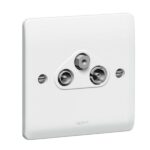
The Legrand Synergy White TV+FM+Sat Socket is an electrical socket designed to provide connection points for television, FM radio, and satellite signals. It is designed to be installed into a wall and has a white finish that blends in with most interior decor. The socket has three separate connections, each labelled for their respective signal types: TV, FM, and SAT. The TV and FM connections are designed to be used with standard coaxial cables, while the SAT connection is designed for use with satellite cables.
The Legrand Synergy White TV+FM+Sat Socket is compatible with a wide range of satellite and TV systems, making it a versatile solution for homes or businesses that require multiple signal connections. It is also designed to be used in conjunction with other Legrand Synergy products, such as switches, dimmers, and outlets, to create a coordinated look and functionality throughout a room or building.
Features
- Three separate connections
- Designed to be used with standard coaxial cables
- designed for use with satellite cables
How to use
Step 1: Turn off the power to the electrical circuit where you will be installing the socket. You can do this by switching off the circuit breaker or removing the fuse.
Step 2: Remove the cover plate from the existing electrical box, and then remove the old socket from the box.
Step 3: Identify the three separate connection points on the Legrand Synergy White TV, FM, and Sat Socket. The connections will be labelled for TV, FM, and SAT.
Step 4: Connect the coaxial cable for your TV and FM signals to the TV and FM connections on the socket using the screw terminals provided. Be sure to connect the cable to the correct terminals; typically, the centre conductor of the coaxial cable goes to the centre terminal on the socket, while the outer conductor goes to the outer terminal.
Step 5: Connect the satellite cable to the SAT connection on the socket, using the appropriate connectors. Depending on your satellite system, you may need to use a different type of connector than the standard coaxial connector.
Step 6: Attach the Legrand Synergy White TV, FM, and Sat Socket to the electrical box using the screws provided.
Step 7: Replace the cover plate over the socket.
Step 8: Restore power to the circuit by turning on the circuit breaker or replacing the fuse.







 Showers & Hoses
 Construction Adhesives
 Construction Chemicals
 Adhesives / Sealants
 General Supplies
 Site Essentials
 Circuit Breakers
 Switches & Sockets
 Interior Wall Paint
 Interior Emulsion Paint
 Matt Finish Emulsion
 Silk Finish Emulsion
 Paint
Paint Spray Paints
 Primers & Sealers
 Angle Valves
 Faucet and Mixers
 Shattafs
 Shower Set