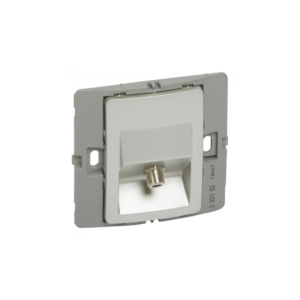
The Legrand Mallia TV-R-SAT socket is a type of wall socket designed for TV and satellite connections. It features two separate connectors: a female “F” type terminal for TV connections and an “F” type terminal for satellite connections. The socket is designed to work with both analogue and digital TV signals. The TV-R-SAT socket is typically installed on a wall in a room where a TV and satellite box are used.
It is designed to provide a convenient and secure way to connect the TV and satellite box to the cable or satellite dish. The socket can be used with a range of different cables, depending on the requirements of the TV and satellite box being used. The socket is designed for easy installation and can be fitted into a standard electrical box.
It is also compatible with the Legrand Mallia range of modular plates and frames, allowing it to be integrated into a wider range of electrical installations. To use the Legrand Mallia TV-R-SAT socket, you will typically need to connect the TV and satellite box to the relevant connectors on the socket using suitable cables.
Benefits
- Easy to Install
- High-quality Materials
- Versatile
- Simple Design
- Stylish Design
Features
- Has two “F” type terminals labelled “TV” and “SAT”
- Has a sleek and modern design
- Standard electrical box
How to use
Step 1: Choose a suitable location for the socket on the wall, near the TV and satellite box.
Step 2: Before installing the socket, turn off the power supply to the electrical circuit.
Step 3: Fit the socket into a standard electrical box and secure it in place using the screws provided.
Step 4: Connect the TV and satellite box to the relevant connectors on the socket using suitable cables. The satellite connection should be connected to the “F” type terminal labelled “SAT,” and the TV connection should be connected to the “F” type terminal labelled “TV.”.
Step 5: Once the cables are connected, turn on the power supply to the electrical circuit.
Step 6: Switch on the TV and satellite box and check that you are receiving a signal. If you experience any issues with the signal, check that the cables are securely connected and that they are compatible with the TV and satellite box.







 Showers & Hoses
 Construction Adhesives
 Construction Chemicals
 Adhesives / Sealants
 General Supplies
 Site Essentials
 Circuit Breakers
 Switches & Sockets
 Interior Wall Paint
 Interior Emulsion Paint
 Matt Finish Emulsion
 Silk Finish Emulsion
 Paint
Paint Spray Paints
 Primers & Sealers
 Angle Valves
 Faucet and Mixers
 Shattafs
 Shower Set