41.38 د.إ
Notice: Pricing Updates
Due to current global supply and market conditions, product prices may occasionally change. If there is any change in the price of items in your order, our customer support team will reach out to you for confirmation before proceeding further. We sincerely appreciate your understanding and thank you for your continued support.
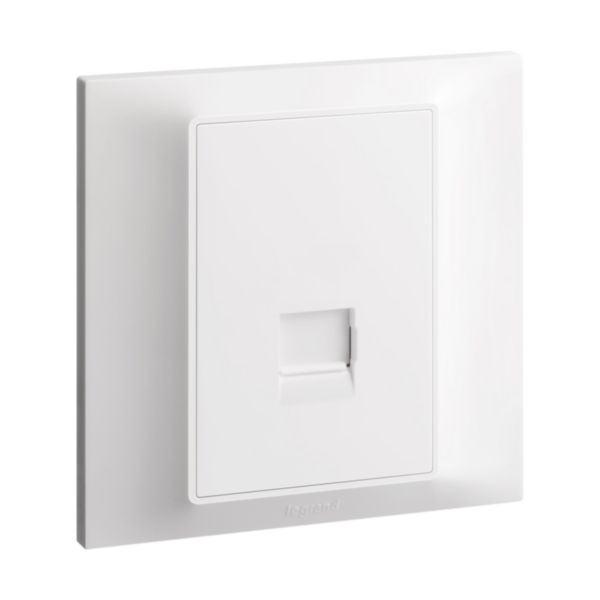
- Has a standard UK size that is compatible with most telephone systems
- Plate has a single port for connecting one telephone device
- Plate is designed as a secondary socket
10 in stock
A Telephone Socket Single Secondary (UK) is a type of phone jack that is commonly used in the United Kingdom to connect a secondary phone line to a telephone or other device. It is also commonly referred to as a BT socket, named after the company that originally developed the design. The Telephone Socket Single Secondary (UK) has a single connection point and is used for connecting a secondary phone line to a telephone or other device.
The socket has a rectangular shape with two small, rectangular-shaped slots for inserting the plug of a phone line. The socket is typically mounted on a wall or other surface and is connected to the secondary phone line using a twisted pair of wires. The socket also typically includes a removable front cover, which can be removed to allow access to the wiring for maintenance or repairs.
Features
- Has a standard UK size that is compatible with most telephone systems
- Plate has a single port for connecting one telephone device
- Plate is designed as a secondary socket
How to use
Step 1: Turn off the power to the telephone system before beginning the installation process.
Step 2: Locate the electrical box where you want to install the wall plate.
Step 3: Place the Telephone SKT Single Secondary UK wall plate over the back box, ensuring that it is flush against the wall.
Step 4: Use the provided mounting screws to secure the wall plate to the back box.
Step 5: Connect the telephone cable to the screw terminals on the wall plate. Make sure to connect the cable securely and according to the manufacturer’s instructions.
Step 6: Turn on the power to the telephone system.
Step 7: Test the connection by plugging in a telephone device and checking for a dial tone.

Showers & Hoses
Construction Adhesives
Construction Chemicals
General Supplies
Site Essentials
Circuit Breakers
Interior Wall Paint
Interior Emulsion Paint
Matt Finish Emulsion
Silk Finish Emulsion
Paint
Spray Paints
Primers & Sealers
Angle Valves
Faucet and Mixers
Shattafs
Shower Set